Trying to get my mom to switch to Linux. She's actually very open to the idea. She's tired of the constant software updates as well as the virus and spyware scans. Of course, there are still software updates with Linux, but they all come from one central location, instead of having to update your browser, then your email client, then your office suite, etc., so it keeps things a little simpler.
I burned an Ubuntu Live CD for her to try out, but I was actually pretty disappointed with it. One of the things she needs to have is an office suite. I'm sure Openoffice will do the trick for her, but it took forever to open with the live cd. I warned her that running Linux from a cd would be much slower than from the hard drive, but it was ridiculous. She did get to see a video of Nelson Mandela explaining what "ubuntu" means, though. She thought that was pretty neat.
Next time I'm over I'll just install the Windows version of Openoffice and get her to try it, or just install Ubuntu on her computer as a dual boot.
It's cool that she's so open to it. I was talking to a friend on the weekend who's a Unix system admin who thought Linux was difficult to install and maintain.
I have a review of an O'Reilly book that needs to be done, too. I finished reading it last Saturday, but want to go over it again and make some notes. I sort of geeked out when I got it and read straight through it. There's another book available from the same publisher, but I'd like to get the review out for this one before requesting another. Plus I just asked for a review copy of another book (a science fiction anthology) and don't want to over-commit myself.
Wednesday, January 31, 2007


Sunday, January 21, 2007
Simple DVD Re-Authoring in Linux
The other night I sat down with my girlfriend to watch Lord of the Rings: Fellowship of the Ring. It's one of the few movies we both enjoy and can watch over and over again. I noticed an odd thing after I inserted the DVD, however. The movie went straight to the menu. There were no previews, no studio splash screens, no advertisements, no videos telling me not to steal this movie that I had already paid for. It was refreshing.
Sometimes, though, when you put in a DVD you are subjected to endless previews, piracy warnings, and splash screens that can last minutes before you finally get to the menu. It's not too bad when you can skip them, but some DVDs disable the "next" button, forcing you to sit through them.
If it's a movie you only watch once or twice it may not be a big deal, but if it's one you want to see over and over again it is especially irritating. When this is done with kid's movies it's almost unforgivable, as they tend to enjoy watching the same video many times.
K9Copy will allow you to re-author your annoying, but beloved, DVD to skip all the content that annoys you, while letting you keep the movie and extras that you enjoy, resizing the movie to fit on a 4.7 GB disc if necessary. It will also let you put the original DVD away from harm. Any horrible accidents involving your DVD, peanut butter, and the dog will be restricted to the copy.K9Copy should be available in your distribution's repositories. If not, there are packages for various distributions here.
Sometimes, though, when you put in a DVD you are subjected to endless previews, piracy warnings, and splash screens that can last minutes before you finally get to the menu. It's not too bad when you can skip them, but some DVDs disable the "next" button, forcing you to sit through them.
If it's a movie you only watch once or twice it may not be a big deal, but if it's one you want to see over and over again it is especially irritating. When this is done with kid's movies it's almost unforgivable, as they tend to enjoy watching the same video many times.
K9Copy will allow you to re-author your annoying, but beloved, DVD to skip all the content that annoys you, while letting you keep the movie and extras that you enjoy, resizing the movie to fit on a 4.7 GB disc if necessary. It will also let you put the original DVD away from harm. Any horrible accidents involving your DVD, peanut butter, and the dog will be restricted to the copy.K9Copy should be available in your distribution's repositories. If not, there are packages for various distributions here.
We are going to re-author Shrek 2. It's a great movie, but there are almost 5 minutes of splash screens and previews before you are allowed to get to the menu, and they are not skippable. We're going to make a good DVD even better.
Insert the DVD into your DVD drive and open K9Copy. If you don't see a list of the DVD titles in the window, clicking on the folder at the top left will open the DVD.
Click on the top box beside the DVD disc title, in this case where it says SHREK_2. This will select all the titles, and we can now remove the ones we don't want.
Now we have a long list of titles, but what are they? Which to keep, and which to pitch? If you highlight a title (not a titleset) and press the camera icon at the top, it will play that title for you.
The first six titles (titlesets one through four) are either blank or annoying previews and splashscreens. We can uncheck those titlesets, and the movie and extras we want to keep will be intact.
If you want to keep the original menus, check the Keep original menus box at the bottom left hand corner, otherwise K9Copy will reauthor the DVD with no menus. If you decide to go with no menus you can select the order in which the titles will be played in the right pane of the window.
I only have the one DVD drive, and K9Copy has a nasty habit of crashing on me when the output device I select is the same as the input device, so I'm selecting ISO Image as the output, and we'll burn it to DVD separately.
Click on the DVD icon on the toolbar, and select where to save the ISO image. You'll have time for a coffee now, so go ahead. We'll wait.
We're almost done. Insert a blank DVD. If you use Gnome you can open Nautilus (the file manager), find the ISO image and right click it. Choose Write to Disc, and Nautilus will burn the image for you.
It's almost as easy in KDE. Right click the ISO image in Konqueror, select Actions, then Write CD Image with K3B.
Now you can watch the content you paid for in the way you want to, giving you back control of your DVD player.
Do you have any other suggestions or questions? Let me know by leaving a comment or emailing me.
Saturday, January 20, 2007
Making DVDs with DeVeDe
Mary-Ellen read my Blogcritics article about making DVDs in Linux, and after a little help was able to burn a DVD. The problem she's having is that there are clicks in the audio.
I've suggested changing the audio codec in Avidemux from the default Twolame to perhaps FFM MP2 or FFM AC3. Sometimes it takes a little experimentation until you hit the right mix. The problem, of course, is that transcoding can take a few hours and experimenting can be frustrating. You can cut down the time Avidemux takes to transcode at the expense of quality by selecting the DVD codec rather than the default 2-pass DVD (lavc) under Video on the left side of the Avidemux window. The best I can say is keep on trying. Even in Windows transcoding can be a frustrating experience.
The other option I suggested was to try another program to do the transcoding. DeVeDe uses another method to transcode video, so it may work where Avidemux doesn't. It can also author a DVD, but it won't create menus. If you want menus you can use another program such as DVDStyler to author it.
DeVeDe should be available in your distribution's repositories. Mary-Ellen uses Ubuntu, so she should be able to install it with Synaptic.
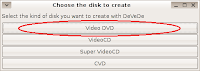
When you first open DeVeDe you are given the option of choosing different discs to create. Select Video DVD.
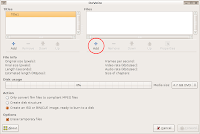
Under Files on the top rigtht of the window, click Add.
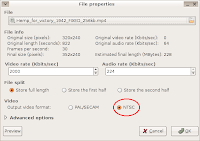
Select the file you want to convert. You also need to select the video format here. It defaults to PAL/SECAM, which is used in Europe, so if you live in North America you'll want to change this to NTSC.
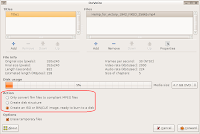
Click OK. Now we want to choose how the converted file will be saved. Choose Only convert film files to compliant MPEG files if you want to save the file as an MPEG-2 file and author it with another program such as DVDStyler. I've shown how to use DVDStyler in my Blogcritics article.
Create disc structure will make a VIDEO_TS and AUDIO_TS folder with the menu files and VOB video files necessary to create a DVD. These can be used by a disc burning program to make a DVD.
We're going to Create an ISO or BIN/CUE image, ready to burn to a disk. Click that option, then click Forward.
Select where you want the image saved, and name it. Click OK.
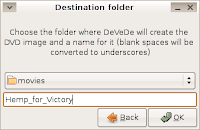
DeVeDe will now spend some time transcoding the movie and creating the disc image. Time to have some dinner, watch TV, or have a nap.
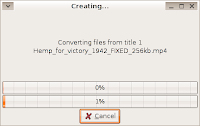
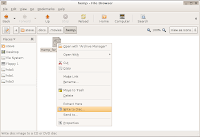
Once it's done, we have to burn the image to a DVD. In Gnome it's really easy. Just open up Nautilus, the file manager, find the iso image, right click it, and select Write to Disc.
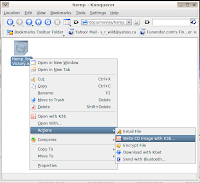
It's almost as easy in KDE. Find the iso file in Konqueror, right click it, go to Actions and then select Write CD Image with K3B. When K3B pops up, click Start.
That's it. I hope this helps. Let me know if you have any suggestions or problems. And I know the example movie I use is, umm, odd. It's for my next Blogcritics article, which I'm going to get to at any moment now. Really.
I've suggested changing the audio codec in Avidemux from the default Twolame to perhaps FFM MP2 or FFM AC3. Sometimes it takes a little experimentation until you hit the right mix. The problem, of course, is that transcoding can take a few hours and experimenting can be frustrating. You can cut down the time Avidemux takes to transcode at the expense of quality by selecting the DVD codec rather than the default 2-pass DVD (lavc) under Video on the left side of the Avidemux window. The best I can say is keep on trying. Even in Windows transcoding can be a frustrating experience.
The other option I suggested was to try another program to do the transcoding. DeVeDe uses another method to transcode video, so it may work where Avidemux doesn't. It can also author a DVD, but it won't create menus. If you want menus you can use another program such as DVDStyler to author it.
DeVeDe should be available in your distribution's repositories. Mary-Ellen uses Ubuntu, so she should be able to install it with Synaptic.
When you first open DeVeDe you are given the option of choosing different discs to create. Select Video DVD.

Under Files on the top rigtht of the window, click Add.

Select the file you want to convert. You also need to select the video format here. It defaults to PAL/SECAM, which is used in Europe, so if you live in North America you'll want to change this to NTSC.

Click OK. Now we want to choose how the converted file will be saved. Choose Only convert film files to compliant MPEG files if you want to save the file as an MPEG-2 file and author it with another program such as DVDStyler. I've shown how to use DVDStyler in my Blogcritics article.
Create disc structure will make a VIDEO_TS and AUDIO_TS folder with the menu files and VOB video files necessary to create a DVD. These can be used by a disc burning program to make a DVD.
We're going to Create an ISO or BIN/CUE image, ready to burn to a disk. Click that option, then click Forward.

Select where you want the image saved, and name it. Click OK.

DeVeDe will now spend some time transcoding the movie and creating the disc image. Time to have some dinner, watch TV, or have a nap.

Once it's done, we have to burn the image to a DVD. In Gnome it's really easy. Just open up Nautilus, the file manager, find the iso image, right click it, and select Write to Disc.

It's almost as easy in KDE. Find the iso file in Konqueror, right click it, go to Actions and then select Write CD Image with K3B. When K3B pops up, click Start.

That's it. I hope this helps. Let me know if you have any suggestions or problems. And I know the example movie I use is, umm, odd. It's for my next Blogcritics article, which I'm going to get to at any moment now. Really.
Sunday, January 14, 2007
True Story
Had lunch with the girlfriend while we were shopping the other day, and started reminiscing about old times.
My favourite story I like to tell others about her happened a couple of winters ago. We were leaving my building and as I stepped out I saw a sheet of ice on the ground around the door. Very slippery. I said to her, "Be careful, it's slippery."
She stepped out, and promptly fell on her bottom. To my credit, I did not take any pleasure at all in this. I did not laugh or even smile. I was genuinely concerned for her as I helped her up and asked if she was okay.
"You could have told me it was slippery!" , she barked at me. I was a little surprised by the unfairness of this.
"I did tell you it was slippery!"
"You didn't tell me HOW slippery!"
In a small, small way she reminds me of this guy's girlfriend. But only in a small way. Really.
My favourite story I like to tell others about her happened a couple of winters ago. We were leaving my building and as I stepped out I saw a sheet of ice on the ground around the door. Very slippery. I said to her, "Be careful, it's slippery."
She stepped out, and promptly fell on her bottom. To my credit, I did not take any pleasure at all in this. I did not laugh or even smile. I was genuinely concerned for her as I helped her up and asked if she was okay.
"You could have told me it was slippery!" , she barked at me. I was a little surprised by the unfairness of this.
"I did tell you it was slippery!"
"You didn't tell me HOW slippery!"
In a small, small way she reminds me of this guy's girlfriend. But only in a small way. Really.
Wednesday, January 10, 2007
Sister Knows Best
Sigh. After my sister nagged me for literally months to start writing for Blogcritics my first article got on the front page of Digg. Her response was, "Is this a good time to say I told you so? There's an appetite out there for the kind of stuff you geek out over. Congrats!"
When my second article went up on Blogcritics she said, "...you're gonna get dugg." I said, " ...it's not going to get dugg, it's sitting at 18 right now, and I don't think it will get much more."
I'm not going to argue with her anymore. My second article went to Digg's front page tonight. That's two articles for two. She knows best.
I was actually surprised. The article was pretty basic, just a few examples of music players with a brief description of each. It wasn't nearly as good as the one on making DVDs. However, when I mentioned this, my sister said, "shut up with the self deprecation, geek boy."
As I said, I'm not going to argue with her anymore. I'll shut up.
Oh, and by the way, I'm not going to write about every single time I get on Digg anymore either. Now I'll be coolly nonchalant, "Digg? Oh, yes, I don't think I had an article on there yesterday, but I'm writing another one today so I'll be back up there soon."
Actually, that's not so much coolly nonchalant as obnoxiously boorish. I can go with that, too.
When my second article went up on Blogcritics she said, "...you're gonna get dugg." I said, " ...it's not going to get dugg, it's sitting at 18 right now, and I don't think it will get much more."
I'm not going to argue with her anymore. My second article went to Digg's front page tonight. That's two articles for two. She knows best.
I was actually surprised. The article was pretty basic, just a few examples of music players with a brief description of each. It wasn't nearly as good as the one on making DVDs. However, when I mentioned this, my sister said, "shut up with the self deprecation, geek boy."
As I said, I'm not going to argue with her anymore. I'll shut up.
Oh, and by the way, I'm not going to write about every single time I get on Digg anymore either. Now I'll be coolly nonchalant, "Digg? Oh, yes, I don't think I had an article on there yesterday, but I'm writing another one today so I'll be back up there soon."
Actually, that's not so much coolly nonchalant as obnoxiously boorish. I can go with that, too.
Monday, January 08, 2007
Playing Music on Linux
There are a lot of music players available for Linux. If most of them were junk it would be easy to choose one to use regularly, but that's not the case. There are many good quality players, but they all have different features. This article is meant to assist you in choosing the one that's right for you.
This list is by no means complete, but it should give you an idea of what's available.
XMMS
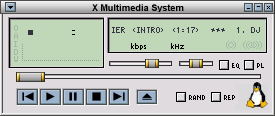
This is the old warhorse of graphical music players on Linux. There are a ton of plugins to extend its functionality as well as skins to change its appearance. The interface is simple if you just want to play music, but it is a bit clunky once you start getting into more advanced features. There are a lot of people that still use this one, but it is dated and some distributions (such as Gentoo) aren't including it anymore.
Noatun
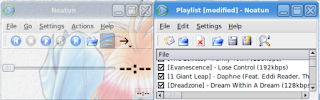
Another simple media player for KDE. Plugins are available, and it is skinnable. It uses simple playlists and isn't a bad choice if all you want to do is play music.
Amarok
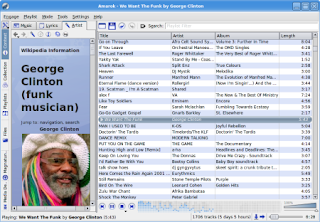
This is the player I use. In my opinion it is the most advanced player out there for Linux. Smart playlists, lyrics, album covers, tagging, information about the artists from Wikipedia, transfer music to and from digital audio players, an integrated music store (Magnatunes.com), and way more that I can't describe in the space I have.
Juk
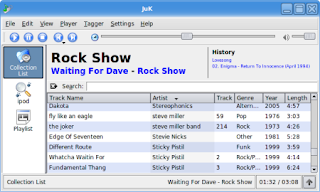
Juk will organize your music into playlists, and can include album covers as well. It will also burn playlists as audio or data cds through K3b.
Rhythmbox
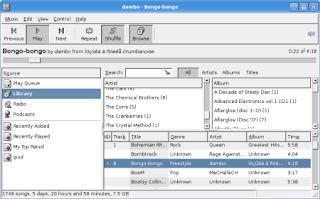
This is a decent music management program. You can create smart playlists, fetch podcasts, and create audio cds from playlists. The most recent versions support iPods and other portable audio players, although it did give me problems with my iPod Shuffle.
Quod Libet
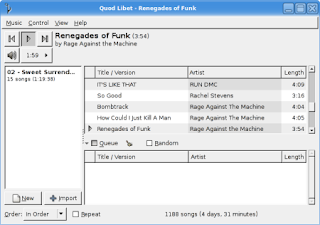
No smart playlists, but it does have plugins for Wikipedia information on artist or album, album covers, burning to cd, and lots more.
Banshee
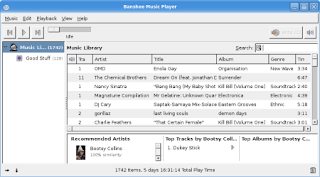
Banshee will burn selected songs onto an audio CD, supports cover art, and with plugins supports smart playlists, song recommendations through Lastfm.com, podcasts, and more. If Banshee was able to transfer music to my iPod Shuffle this is the player I'd be using, simply because it allows limiting the size of playlists based on MB.
Summary
If all you want is something that just plays music from a simple playlist Noatun is the way to go, although XMMS still has its fans.
If you want to be able to sync your portable audio player and want a music management system like iTunes, Amarok is a great piece of software. Banshee would be my recommendation if you don't need support for a digital audio player.
What did I miss? Do you have any other recommendations, or do you disagree with mine? Let me know by leaving a comment or emailing me.
This list is by no means complete, but it should give you an idea of what's available.
XMMS

This is the old warhorse of graphical music players on Linux. There are a ton of plugins to extend its functionality as well as skins to change its appearance. The interface is simple if you just want to play music, but it is a bit clunky once you start getting into more advanced features. There are a lot of people that still use this one, but it is dated and some distributions (such as Gentoo) aren't including it anymore.
Noatun

Another simple media player for KDE. Plugins are available, and it is skinnable. It uses simple playlists and isn't a bad choice if all you want to do is play music.
Amarok

This is the player I use. In my opinion it is the most advanced player out there for Linux. Smart playlists, lyrics, album covers, tagging, information about the artists from Wikipedia, transfer music to and from digital audio players, an integrated music store (Magnatunes.com), and way more that I can't describe in the space I have.
Juk

Juk will organize your music into playlists, and can include album covers as well. It will also burn playlists as audio or data cds through K3b.
Rhythmbox

This is a decent music management program. You can create smart playlists, fetch podcasts, and create audio cds from playlists. The most recent versions support iPods and other portable audio players, although it did give me problems with my iPod Shuffle.
Quod Libet

No smart playlists, but it does have plugins for Wikipedia information on artist or album, album covers, burning to cd, and lots more.
Banshee

Banshee will burn selected songs onto an audio CD, supports cover art, and with plugins supports smart playlists, song recommendations through Lastfm.com, podcasts, and more. If Banshee was able to transfer music to my iPod Shuffle this is the player I'd be using, simply because it allows limiting the size of playlists based on MB.
Summary
If all you want is something that just plays music from a simple playlist Noatun is the way to go, although XMMS still has its fans.
If you want to be able to sync your portable audio player and want a music management system like iTunes, Amarok is a great piece of software. Banshee would be my recommendation if you don't need support for a digital audio player.
What did I miss? Do you have any other recommendations, or do you disagree with mine? Let me know by leaving a comment or emailing me.
Sunday, January 07, 2007
Dugg
Well, this is pretty cool. I write one damn article for BlogCritics, and it gets on the front page of digg. It's also on reddit and Netscape, but no one there seems to care.
I feel almost bad about slamming the digg commenters in my last post, especially as there are some useful comments for this one. Nice that some people find it helpful.
I feel almost bad about slamming the digg commenters in my last post, especially as there are some useful comments for this one. Nice that some people find it helpful.
Friday, January 05, 2007
Forum Wars
A couple of days ago a post by my sister hit the front page of digg. This was pretty cool, although she already has lots of readers and media attention thanks to her Blogcritics posts, her blog, and her TV, Eh? website. I thought her post was interesting, but nothing new, mostly because I already use open source software almost exclusively.
Others obviously found it useful and interesting. She has a fairly large readership, but all it took for it to hit critical mass was for her to mention open source and Linux. She has received all kinds of emails and comments.
The interesting thing to me is that the comments from digg were very different from the comments she received from Blogcritics. I read digg everyday, but for the most part I use it to find interesting resources or sites, and have stopped reading the comments. For some reason they almost all descend into arguments as to whether the article is a dupe, blog, inaccurate, or whatever. Lots of inane, uninformative jabber that doesn't contribute to a discussion.
A lot of the comments on digg concentrated on whether or not she was a techie, with some stating they were burying the story as inaccurate. They seemed to feel she was trying to put something over on them, and missed the point of the article entirely. It seems they were confused by the thought that a person could be intelligent and not a techie at the same time. Some seemed to feel that the ability to maintain a website made a person a techie. And some didn't quite know what to make of the word "communications."
The Blogcritics commenters on the other hand were, as Diane put it, "Really supportive, helpful people with common sense." A lot of them were Linux zealots (sometimes we can be almost as bad as Mac zealots), but they seemed to genuinely want to help, or at least add intelligently to the discussion.
Obviously I'm generalizing here. There are intelligent comments posted on digg, and I'm sure there are boneheads commenting on Blogcritics, but there seems to be a definite trend in the quality of comments depending on the forum. Perhaps the popularity of digg brings out more of the unwashed masses, or maybe a secret cabal weeds out the undesirables from Blogcritics.
And for the record, although she is intelligent, articulate, and has many talents, she is definitely not a techie.
Others obviously found it useful and interesting. She has a fairly large readership, but all it took for it to hit critical mass was for her to mention open source and Linux. She has received all kinds of emails and comments.
The interesting thing to me is that the comments from digg were very different from the comments she received from Blogcritics. I read digg everyday, but for the most part I use it to find interesting resources or sites, and have stopped reading the comments. For some reason they almost all descend into arguments as to whether the article is a dupe, blog, inaccurate, or whatever. Lots of inane, uninformative jabber that doesn't contribute to a discussion.
A lot of the comments on digg concentrated on whether or not she was a techie, with some stating they were burying the story as inaccurate. They seemed to feel she was trying to put something over on them, and missed the point of the article entirely. It seems they were confused by the thought that a person could be intelligent and not a techie at the same time. Some seemed to feel that the ability to maintain a website made a person a techie. And some didn't quite know what to make of the word "communications."
The Blogcritics commenters on the other hand were, as Diane put it, "Really supportive, helpful people with common sense." A lot of them were Linux zealots (sometimes we can be almost as bad as Mac zealots), but they seemed to genuinely want to help, or at least add intelligently to the discussion.
Obviously I'm generalizing here. There are intelligent comments posted on digg, and I'm sure there are boneheads commenting on Blogcritics, but there seems to be a definite trend in the quality of comments depending on the forum. Perhaps the popularity of digg brings out more of the unwashed masses, or maybe a secret cabal weeds out the undesirables from Blogcritics.
And for the record, although she is intelligent, articulate, and has many talents, she is definitely not a techie.
Monday, January 01, 2007
Free Movies Redux
This is an edit of a previous post that I've changed to concentrate on Windows and VCDs (Video CDs) at the request of a friend.
First we want to get a movie that we can burn to a CD. A great source of free, public domain movies is Public Domain Torrents. You will need a bittorrent client to download the movies. uTorrent is what I use for Windows. For this example I've chosen to download Night of the Living Dead. It will take a few hours, perhaps overnight or longer, to download a movie depending on your connection speed and the size of the movie.
Once the movie is downloaded we have to convert it to a format that is readable by DVD players. We're going to use Avidemux. You can download the Windows version from here.
There are two types of VCDs: regular VCDs have a resolution of 352 x 240, about the same quality as VHS tapes, or Super VCDs that have 480 x 480 resolution, higher quality but will take more space than a regular VCD. A movie that might fit on one CD as a VCD will need to be put on two or more CDs if it is a Super VCD.
Also, not all DVD players will play SVCDs, but most will play VCDs. Check the specs of your player.
Once you've installed Avidemux open the movie, select Auto -> VCD or SVCD, hit Save, and relax for a couple of hours while it converts the movie.

Avidemux will automatically split the movie into two or more files so they will fit on a CD.
Once Avidemux is finished you should be able to burn the files to CDs with your CD burning program. Details will depend on your CD burning software, but I believe most CD burning programs will give you an option to burn VCDs. You may need a separate plugin to burn SVCDs because of licensing issues with the MPEG2 codec.
There are some other great resources for making video VCDs. The Internet Archive is another great source for public domain movies. Files are downloaded directly from their servers, so you don't need a bittorrent client, but sometimes can be slow. The video quality of the movies is also less, but there are a lot of them.
Christmas Present reviews
I got some gadgets for Christmas and thought I'd take the opportunity to let you know how everything worked on my Linux setup.
I already let you know how things went with my digital camera, a Kodak EasyShare C533. Not so much with the camera as with my desktop manager. Gnome is working well for me, and I'm using digiKam to import and organize my photos. Very nice piece of software. I'm finding that even though I'm using Gnome most of my favourite apps are from KDE.
My new keyboard is a Microsoft Comfort Curve, an inexpensive keyboard that has a very nice feel once you get used to it. Again, the main problems I had with it had to do with KDE not recognizing all of the extra multimedia keys. Gnome recognized all of them without a problem.
I also got an Epson Picturemate photo printer to go with the camera. It's very small, looking like a high-tech lunch box with its handle. Epson claims that photos printed with it will last up to 200 years. I'll let you know.
I was only slightly worried that I would have problems with it in Linux as Epson printers generally have excellent Linux support. I needn't have worried at all. Adding the printer was a snap with Gnome's printer manager, and I was able to print out great looking photos right away, in both wallet size and 4" x 6".
I'm also very happy with my new LCD monitor. On paper it's the same size as my old 17" CRT monitor, but we all know CRT manufacturers lie. There's a noticeable amount more screen real estate, and the picture is brighter and the colours are more vibrant. I have a feeling there wasn't much life left in the old monitor.
None of my other gifts were compatible with Linux, like the showerhead and bicycle pump, but they seem to work as stand-alone devices well enough.
Have a happy New Year everyone.
I already let you know how things went with my digital camera, a Kodak EasyShare C533. Not so much with the camera as with my desktop manager. Gnome is working well for me, and I'm using digiKam to import and organize my photos. Very nice piece of software. I'm finding that even though I'm using Gnome most of my favourite apps are from KDE.
My new keyboard is a Microsoft Comfort Curve, an inexpensive keyboard that has a very nice feel once you get used to it. Again, the main problems I had with it had to do with KDE not recognizing all of the extra multimedia keys. Gnome recognized all of them without a problem.
I also got an Epson Picturemate photo printer to go with the camera. It's very small, looking like a high-tech lunch box with its handle. Epson claims that photos printed with it will last up to 200 years. I'll let you know.
I was only slightly worried that I would have problems with it in Linux as Epson printers generally have excellent Linux support. I needn't have worried at all. Adding the printer was a snap with Gnome's printer manager, and I was able to print out great looking photos right away, in both wallet size and 4" x 6".
I'm also very happy with my new LCD monitor. On paper it's the same size as my old 17" CRT monitor, but we all know CRT manufacturers lie. There's a noticeable amount more screen real estate, and the picture is brighter and the colours are more vibrant. I have a feeling there wasn't much life left in the old monitor.
None of my other gifts were compatible with Linux, like the showerhead and bicycle pump, but they seem to work as stand-alone devices well enough.
Have a happy New Year everyone.
Friday, December 29, 2006
Christmas Cheer
Wow. It's been way too long since I've updated. I'll probably start lots of posts this way.
It was a good Christmas. Looking at the gifts I got this year, I'm beginning to suspect that some of my friends and family think I'm a bit of a geek.
My girlfriend got me a new keyboard, as the cord on my old one was frayed and I had to splice it together. It worked, just looked really ugly with a big wad of electrical tape wrapped around the cord.
She also got me this:

It's a Spudtrooper: Mr. Potatohead working for the Dark Side! She was a little puzzled as to why he was holding a masher, but what else would rebel potatoes fear more?
And like any good minion, he stores his extra equipment in his ass:

Oh, and I got a digital camera and a photo printer from my mother. After fighting for a couple of hours trying to transfer pictures to my computer in KDE, I gave up and tried Gnome. Worked like a charm the first time. I haven't tried the photo printer yet, but I will.
I don't know if this was a KDE thing or an Ubuntu thing this time, but although I love KDE's customization I find it to be a little flaky in a lot of things. It won't detect all my multimedia keys properly while Gnome does, power saving works, sort of, sometimes, and it doesn't always remember what default programs I want it to use.
Looks like I'll be trying Gnome again for a while.
My sister got me an LCD monitor, which is beautiful. I felt really bad, because all I got her was a half tube of used lipstick and a pack of Tic Tacs.
And I swear I won't do this regularly, but I had to take this picture of my stupid cat stuffing himself in a box:

No, he's not jumping into a fishbowl, but I'm sure he would if I had one. Even if it was full of water and fish.
I will be back with other compelling, fascinating posts, so keep tuned.
It was a good Christmas. Looking at the gifts I got this year, I'm beginning to suspect that some of my friends and family think I'm a bit of a geek.
My girlfriend got me a new keyboard, as the cord on my old one was frayed and I had to splice it together. It worked, just looked really ugly with a big wad of electrical tape wrapped around the cord.
She also got me this:

It's a Spudtrooper: Mr. Potatohead working for the Dark Side! She was a little puzzled as to why he was holding a masher, but what else would rebel potatoes fear more?
And like any good minion, he stores his extra equipment in his ass:

Oh, and I got a digital camera and a photo printer from my mother. After fighting for a couple of hours trying to transfer pictures to my computer in KDE, I gave up and tried Gnome. Worked like a charm the first time. I haven't tried the photo printer yet, but I will.
I don't know if this was a KDE thing or an Ubuntu thing this time, but although I love KDE's customization I find it to be a little flaky in a lot of things. It won't detect all my multimedia keys properly while Gnome does, power saving works, sort of, sometimes, and it doesn't always remember what default programs I want it to use.
Looks like I'll be trying Gnome again for a while.
My sister got me an LCD monitor, which is beautiful. I felt really bad, because all I got her was a half tube of used lipstick and a pack of Tic Tacs.
And I swear I won't do this regularly, but I had to take this picture of my stupid cat stuffing himself in a box:

No, he's not jumping into a fishbowl, but I'm sure he would if I had one. Even if it was full of water and fish.
I will be back with other compelling, fascinating posts, so keep tuned.
Sunday, November 26, 2006
Free Movies
Lots of free stuff in this post. Free software, free movies, free DVDs. Well almost. You have to supply the DVDs.
The software used in these steps will work for both Windows and Linux users, since most of it is cross-platform. Except where it isn't. But I'll let you know.
First we want to get a movie that we can burn to a DVD. A great source of free, public domain movies is Public Domain Torrents. You will need a bittorrent client to download the movies. For Windows I use uTorrent, in Linux I've started using KTorrent which has a lot of great features. For this example I've chosen to download Night of the Living Dead. It will take a few hours, perhaps overnight or longer, to download a movie depending on your connection speed and the size of the movie.
Once the movie is downloaded we have to convert it to an MPEG2 format that is readable by DVD players. We're going to use Avidemux. In Linux it's probably available in your package manager (it's in the Ubuntu repositories), and there is a Windows version.
Open the movie, select Auto -> DVD, hit Save, and relax for a couple of hours while it converts the movie.

Now the DVD has to be authored, which means we have to add menus and have the file system set up so a DVD player can read the disc.
I had a lot of trouble deciding between different applications for authoring a DVD because there are so many good ones. I decided to focus on DVDStyler because it's easy to use, can create good looking menus, and is cross-platform, so it can work on both Windows and Linux. Oh yeah, and it's free. [Edit: The wxsvg library is now required for Linux users. You can download it from the DVDStyler website.]
Installation is easy. Windows users just download and run the Win32 binary on the download page. Linux users may have it in their package manager. It's not in the Ubuntu repositories, so I downloaded the Debian package and installed it.
For Ubuntu Linux users: Dapper users shouldn't need to change anything, but because I'm running Edgy Eft I did have to change an option in the settings because it kept throwing me an error about "jpegtopnm" [Update: These settings shouldn't have to be changed under Feisty Fawn]. To fix this you have to go to Configuration -> Settings, and in the Core tab change the first line to:
jpegtopnm "$FILE_IN" | ppmtoy4m -n 1 -I t -L $FRAME_RATE -S 420mpeg2 | mpeg2enc -f 8 -b $BITRATE -o "$FILE_OUT" $VIDEO_NORM
Don't worry, it's not as scary as it looks. Just copy and paste it in, you don't have to know what it means.
There are some excellent manuals and a forum to help you get started, but I'll go over the basics.
First thing we are going to do is choose a background for the menu. It comes with a bunch of backgrounds, but you can import your own if you like. Click the Backgrounds tab on the left and select the one you want.
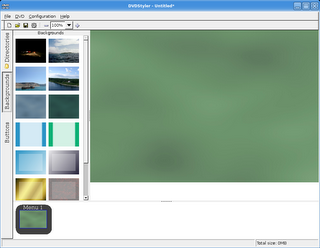
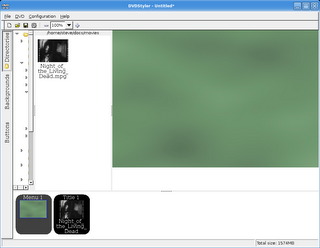
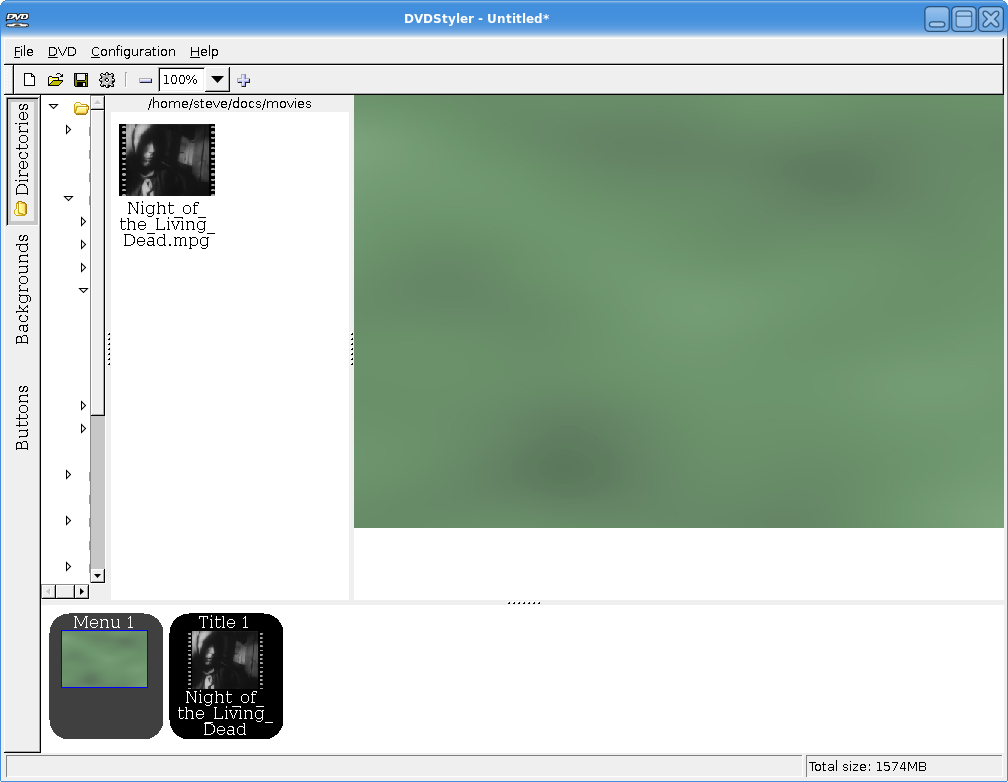
Now select the Directories button on the left and navigate to the directory you saved the converted movie to. Only valid MPEG2 files will be available to select. Select your movie.
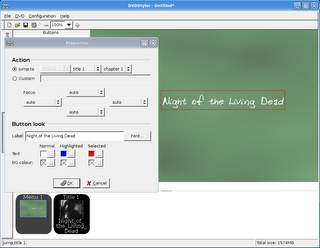
Now let's click the Buttons tab. Drag the "button1" image to the right, right click it, and select Properties. Since there is only one video on this disc the only thing we have to change is the button label, and the font if you wish.
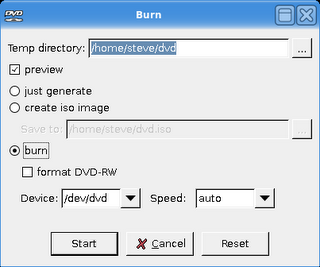
Now you can select File -> Burn DVD from the main menu. Select Burn if you want to burn a disc right away, or you can Just Generate the file system or Create ISO Image if you want to burn the DVD with another program such as K3B.
After a few minutes you should be able to watch your shiny new DVD movie.
There are some other great resources for making video DVDs. The Internet Archive is another great source for public domain movies. Files are downloaded directly from their servers, so you don't need a bittorrent client, but sometimes can be slow. The video quality of the movies is also less, but there are a lot of them.
For authoring DVDs there is also DeVeDe which converts and authors the DVD, eliminating the need for a program like Avidemux. It is simple to use and can automatically divide a movie into chapters. It doesn't create menus though, and is only for Linux.
Tovid is another Linux only program that also converts movies and authors DVDs and allows you to create simple menus. I've had occasional weird issues with the sound not syncing. I can correct this by fast forwarding through part of the movie. It may be an issue with my DVD player. Well worth a try.
The software used in these steps will work for both Windows and Linux users, since most of it is cross-platform. Except where it isn't. But I'll let you know.
First we want to get a movie that we can burn to a DVD. A great source of free, public domain movies is Public Domain Torrents. You will need a bittorrent client to download the movies. For Windows I use uTorrent, in Linux I've started using KTorrent which has a lot of great features. For this example I've chosen to download Night of the Living Dead. It will take a few hours, perhaps overnight or longer, to download a movie depending on your connection speed and the size of the movie.
Once the movie is downloaded we have to convert it to an MPEG2 format that is readable by DVD players. We're going to use Avidemux. In Linux it's probably available in your package manager (it's in the Ubuntu repositories), and there is a Windows version.
Open the movie, select Auto -> DVD, hit Save, and relax for a couple of hours while it converts the movie.
Now the DVD has to be authored, which means we have to add menus and have the file system set up so a DVD player can read the disc.
I had a lot of trouble deciding between different applications for authoring a DVD because there are so many good ones. I decided to focus on DVDStyler because it's easy to use, can create good looking menus, and is cross-platform, so it can work on both Windows and Linux. Oh yeah, and it's free. [Edit: The wxsvg library is now required for Linux users. You can download it from the DVDStyler website.]
Installation is easy. Windows users just download and run the Win32 binary on the download page. Linux users may have it in their package manager. It's not in the Ubuntu repositories, so I downloaded the Debian package and installed it.
For Ubuntu Linux users: Dapper users shouldn't need to change anything, but because I'm running Edgy Eft I did have to change an option in the settings because it kept throwing me an error about "jpegtopnm" [Update: These settings shouldn't have to be changed under Feisty Fawn]. To fix this you have to go to Configuration -> Settings, and in the Core tab change the first line to:
jpegtopnm "$FILE_IN" | ppmtoy4m -n 1 -I t -L $FRAME_RATE -S 420mpeg2 | mpeg2enc -f 8 -b $BITRATE -o "$FILE_OUT" $VIDEO_NORM
Don't worry, it's not as scary as it looks. Just copy and paste it in, you don't have to know what it means.
There are some excellent manuals and a forum to help you get started, but I'll go over the basics.
First thing we are going to do is choose a background for the menu. It comes with a bunch of backgrounds, but you can import your own if you like. Click the Backgrounds tab on the left and select the one you want.

Now select the Directories button on the left and navigate to the directory you saved the converted movie to. Only valid MPEG2 files will be available to select. Select your movie.
Now let's click the Buttons tab. Drag the "button1" image to the right, right click it, and select Properties. Since there is only one video on this disc the only thing we have to change is the button label, and the font if you wish.

Now you can select File -> Burn DVD from the main menu. Select Burn if you want to burn a disc right away, or you can Just Generate the file system or Create ISO Image if you want to burn the DVD with another program such as K3B.

After a few minutes you should be able to watch your shiny new DVD movie.
There are some other great resources for making video DVDs. The Internet Archive is another great source for public domain movies. Files are downloaded directly from their servers, so you don't need a bittorrent client, but sometimes can be slow. The video quality of the movies is also less, but there are a lot of them.
For authoring DVDs there is also DeVeDe which converts and authors the DVD, eliminating the need for a program like Avidemux. It is simple to use and can automatically divide a movie into chapters. It doesn't create menus though, and is only for Linux.
Tovid is another Linux only program that also converts movies and authors DVDs and allows you to create simple menus. I've had occasional weird issues with the sound not syncing. I can correct this by fast forwarding through part of the movie. It may be an issue with my DVD player. Well worth a try.
Sunday, November 19, 2006
New DVD Burner
I was debating on what software to ramble on about for my next post. I'd like to do something that's cross-platform and useful for many people. Firefox is the obvious choice, which is why I'm not going to do it. I may do something on image manipulation.
All that is academic though, because I'm not going to talk about free software my next post. After years of being limited to 700 MB cds and watching video on VCDs I finally got a DVD burner. I'm still experimenting with the best combination of transcoding and authoring software and want to get some screenshots of a video being prepared, so it won't be for another day or two. Or three.
Of course the software I'm using is all free, so I guess I will be talking about free software. I wish it was possible to write about free hardware. Actually, I knew a guy who could get free hardware, but he's doing time right now.
For the record the DVD burner is an LG GSA-H10N 16x Super Multi DVD/CD Rewriter, an inexpensive drive that reads and writes DVD +/- R/RW discs as well as DVD RAM discs. It installed just like any other optical drive, and Ubuntu found it and was able to use it without any hiccups.
I haven't installed or used the Windows software that came with it, but I'll give it a try and let you know how that worked as well.
All that is academic though, because I'm not going to talk about free software my next post. After years of being limited to 700 MB cds and watching video on VCDs I finally got a DVD burner. I'm still experimenting with the best combination of transcoding and authoring software and want to get some screenshots of a video being prepared, so it won't be for another day or two. Or three.
Of course the software I'm using is all free, so I guess I will be talking about free software. I wish it was possible to write about free hardware. Actually, I knew a guy who could get free hardware, but he's doing time right now.
For the record the DVD burner is an LG GSA-H10N 16x Super Multi DVD/CD Rewriter, an inexpensive drive that reads and writes DVD +/- R/RW discs as well as DVD RAM discs. It installed just like any other optical drive, and Ubuntu found it and was able to use it without any hiccups.
I haven't installed or used the Windows software that came with it, but I'll give it a try and let you know how that worked as well.
Sunday, November 12, 2006
Free Stuff
I like free stuff. If a task can be completed without dishing out money for an expensive piece of software, I'm all for it. Why spend money on bytes that could be better spent on more important things, like beer?
There is a lot of software available for free. Just like anything else, a lot of it is crap. A lot of free software actually comes with strings attached, like your personal information, ads, or important features that can only be used if you send the author money.
There are some real gems available if you know where to look. Software that is professional quality with no strings attached. Real alternatives to commercial applications.
I will be showcasing some of my favourite free applications, letting you know what I like and don't like about them, and where to get them. Hope you enjoy.
One of the most important apps for any user is the office suite. The most popular suite is, of course, Microsoft Office. It's an excellent application, with lots of wizards and templates to make tasks easier, and more features than any one person could ever need. It also costs a few hundred dollars, and they keep changing their file format every few releases just to remind everyone they have to upgrade to the newest version or risk not being able to read others' documents.
Another excellent office suite is OpenOffice. It is also has lots of wizards and templates, and more features than any one person could ever need. It is available for free, however. And while it has it's own file format, it can also read and save Microsoft Office documents, which means you will still be able to share documents with people who are broke because they've spent all their money on Microsoft Office. It's also multiplatform: it will run on Windows, Mac OS X, Linux, and FreeBSD.
OpenOffice comes with a word processor called Write, a spread sheet called Calc to replace Excel, presentation software (you know, like Powerpoint) called Impress, and a database application they call Base that replaces Access. There is also a drawing program called Draw.
The wordprocessor does what you would expect a word processor to do: process words. You can also do some neat things, like save your document in Adobe's .pdf format or in Aportisdoc format so you can transfer the file to your Palm device. It has lots of wizards to help with some of the more complex tasks, like mail merge.

The presentation software (called Impress) comes with templates, backgrounds, etc. and starts out with a wizard to help you create your slideshow. It can export your presentation as a Flash file, if you wish, allowing you to post it on the web. It does not come with as much artwork and backgrounds as PowerPoint, but you can download more from the web.

I use the spreadsheet only occasionally, for very basic tasks, but it's served my needs. I've been able to import Microsoft Excel files with no problems, but I understand that some people have had issues with complex Excel files with scripts.
I've never had need for the database, so I won't comment on it.
There are lots of extra templates and artwork available here and at the OpenOffice Extras website as well.
Don't let the fact that it's free fool you. OpenOffice is feature-rich enough for almost any personal or small business use. By not buying Microsoft Office this piece of software will free up money to buy enough beer to keep you drunk at work for a week.
There is a lot of software available for free. Just like anything else, a lot of it is crap. A lot of free software actually comes with strings attached, like your personal information, ads, or important features that can only be used if you send the author money.
There are some real gems available if you know where to look. Software that is professional quality with no strings attached. Real alternatives to commercial applications.
I will be showcasing some of my favourite free applications, letting you know what I like and don't like about them, and where to get them. Hope you enjoy.
One of the most important apps for any user is the office suite. The most popular suite is, of course, Microsoft Office. It's an excellent application, with lots of wizards and templates to make tasks easier, and more features than any one person could ever need. It also costs a few hundred dollars, and they keep changing their file format every few releases just to remind everyone they have to upgrade to the newest version or risk not being able to read others' documents.
Another excellent office suite is OpenOffice. It is also has lots of wizards and templates, and more features than any one person could ever need. It is available for free, however. And while it has it's own file format, it can also read and save Microsoft Office documents, which means you will still be able to share documents with people who are broke because they've spent all their money on Microsoft Office. It's also multiplatform: it will run on Windows, Mac OS X, Linux, and FreeBSD.
OpenOffice comes with a word processor called Write, a spread sheet called Calc to replace Excel, presentation software (you know, like Powerpoint) called Impress, and a database application they call Base that replaces Access. There is also a drawing program called Draw.
The wordprocessor does what you would expect a word processor to do: process words. You can also do some neat things, like save your document in Adobe's .pdf format or in Aportisdoc format so you can transfer the file to your Palm device. It has lots of wizards to help with some of the more complex tasks, like mail merge.
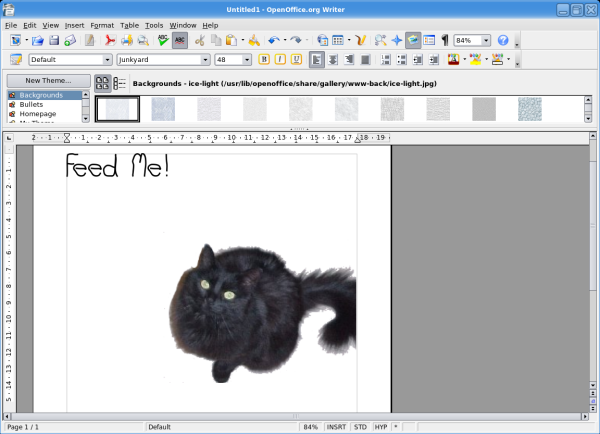
The presentation software (called Impress) comes with templates, backgrounds, etc. and starts out with a wizard to help you create your slideshow. It can export your presentation as a Flash file, if you wish, allowing you to post it on the web. It does not come with as much artwork and backgrounds as PowerPoint, but you can download more from the web.

I use the spreadsheet only occasionally, for very basic tasks, but it's served my needs. I've been able to import Microsoft Excel files with no problems, but I understand that some people have had issues with complex Excel files with scripts.
I've never had need for the database, so I won't comment on it.
There are lots of extra templates and artwork available here and at the OpenOffice Extras website as well.
Don't let the fact that it's free fool you. OpenOffice is feature-rich enough for almost any personal or small business use. By not buying Microsoft Office this piece of software will free up money to buy enough beer to keep you drunk at work for a week.
Sunday, October 29, 2006
Hot Wax
As sort of a present for my girlfriend I got my chest and stomach waxed last week. I'm not going to get into what would possess me to do such a thing.
I didn't take any pictures, but if you want an idea of how it went watch The 40 Year Old Virgin. I'm not saying it's a great movie, but the depiction of the pain I went through is accurate. I am proud to say I was a little more stoic (I didn't call the woman waxing me nasty names), and I actually finished getting the hair removed.
The woman who did the waxing was actually very sweet. She told me she liked hairy men, and kept apologizing during the process. I think it will be easier for me if next time instead of getting waxed I find a girlfriend that likes hair.
I didn't take any pictures, but if you want an idea of how it went watch The 40 Year Old Virgin. I'm not saying it's a great movie, but the depiction of the pain I went through is accurate. I am proud to say I was a little more stoic (I didn't call the woman waxing me nasty names), and I actually finished getting the hair removed.
The woman who did the waxing was actually very sweet. She told me she liked hairy men, and kept apologizing during the process. I think it will be easier for me if next time instead of getting waxed I find a girlfriend that likes hair.
Upgrade
I've been using Ubuntu for a little over a year now, and I haven't been happier with a Linux distribution. I started using Linux with Red Hat 7.2 in about 2002. I moved to Mandrake (now Mandriva) which I used for quite a while, but there always seemed to be something flaky that just didn't work on each release for me. I spent an entire weekend installing just a base system of Gentoo, then another day and a half compiling KDE, then more time compiling... After about a week of that I decided I didn't have the kind of time Gentoo demanded, even though my geek cred would suffer. I'm also administering a Fedora Core 4 server, which I'll have to upgrade soon. I'll probably replace it with Ubuntu 6.06 because of the long (6 years!) support cycle.
Ubuntu has a reputation of being a newbie distro, which is fine with me. It means it's easy to install, maintain, and use. I'm not quite sure why that's a bad thing. There is a huge list of software that can be easily installed, and there is nothing that can't be done with Ubuntu that can be done with any other distribution.
Decided to upgrade my system to Edgy Eft today. Normally I don't wait until the final release of software, installing betas and release candidates. For some reason I've been taking my time though. I hadn't even updated to Firefox 2.0 yet, mostly because I've being Opera lately because of some issues I've been having with Firefox.
I started the install expecting a lot of problems. I opened up a terminal, typed in gksu "update-manager -c" and let 'er rip. After about 2 hours of downloading and installing, I rebooted the system.
After the boot process was finished the nVidia splash screen surprised me by actually appearing, letting me know that my 3D drivers were actually installed and running. After logging in, KDE started up with no problems. KDE 3.5 is looking very pretty too, with lots of neat effects including true transparency of windows. I'm going to install Beryl and see how it looks.
So far everything has gone flawlessly. I'm still expecting trouble, but I'm pretty impressed so far.
Ubuntu has a reputation of being a newbie distro, which is fine with me. It means it's easy to install, maintain, and use. I'm not quite sure why that's a bad thing. There is a huge list of software that can be easily installed, and there is nothing that can't be done with Ubuntu that can be done with any other distribution.
Decided to upgrade my system to Edgy Eft today. Normally I don't wait until the final release of software, installing betas and release candidates. For some reason I've been taking my time though. I hadn't even updated to Firefox 2.0 yet, mostly because I've being Opera lately because of some issues I've been having with Firefox.
I started the install expecting a lot of problems. I opened up a terminal, typed in gksu "update-manager -c" and let 'er rip. After about 2 hours of downloading and installing, I rebooted the system.
After the boot process was finished the nVidia splash screen surprised me by actually appearing, letting me know that my 3D drivers were actually installed and running. After logging in, KDE started up with no problems. KDE 3.5 is looking very pretty too, with lots of neat effects including true transparency of windows. I'm going to install Beryl and see how it looks.
So far everything has gone flawlessly. I'm still expecting trouble, but I'm pretty impressed so far.
Tuesday, October 10, 2006
Random Nonsense
Been a while since my last post.
Turns out I may not be competent to own a cell phone. My last cell I had put through the laundry after I had it for about three weeks. I dropped my current cell phone in a rain puddle after about a week. It dried out and is working fine, but I definitely need to be more careful.
Had Thanksgiving dinner with my mother and a couple of her friends today. Her one friend has been to England a couple of times and is a self appointed expert on all things English. It doesn't matter what we're talking about, she turns the conversation to England. We talked about KFC, she mentioned KFC in England is terrible, we talked about traffic, she starts talking about the roundabouts in England, we were speaking English, she tells us English is from England. Okay, I made up the last one, but I wouldn't have been surprised. She's a lot like the father in My Big Fat Greek Wedding. Without the Windex fetish, though.
Been watching Max Headroom lately. Shame it isn't out on DVD, I'd buy it in a second. Not sure if it's available at the iTunes store as iTunes doesn't work (easily) with Linux. Found it at AOL Television, but you have to have Windows and allow them to install some DRM program to control what you can do with the content.
What I want to do is watch it on my TV. I don't mind paying for it, but don't make it hard to get and limited with what I can do. It's already available for free without any restrictions, why make a crappier version that is difficult for me to get, costs money, and allows you to do less. "Hey buddy, want to buy some air? It's across town, to enter the store you have to wear a Hugo Boss suit, and you can only breath it at home. Three times."
Turns out I may not be competent to own a cell phone. My last cell I had put through the laundry after I had it for about three weeks. I dropped my current cell phone in a rain puddle after about a week. It dried out and is working fine, but I definitely need to be more careful.
Had Thanksgiving dinner with my mother and a couple of her friends today. Her one friend has been to England a couple of times and is a self appointed expert on all things English. It doesn't matter what we're talking about, she turns the conversation to England. We talked about KFC, she mentioned KFC in England is terrible, we talked about traffic, she starts talking about the roundabouts in England, we were speaking English, she tells us English is from England. Okay, I made up the last one, but I wouldn't have been surprised. She's a lot like the father in My Big Fat Greek Wedding. Without the Windex fetish, though.
Been watching Max Headroom lately. Shame it isn't out on DVD, I'd buy it in a second. Not sure if it's available at the iTunes store as iTunes doesn't work (easily) with Linux. Found it at AOL Television, but you have to have Windows and allow them to install some DRM program to control what you can do with the content.
What I want to do is watch it on my TV. I don't mind paying for it, but don't make it hard to get and limited with what I can do. It's already available for free without any restrictions, why make a crappier version that is difficult for me to get, costs money, and allows you to do less. "Hey buddy, want to buy some air? It's across town, to enter the store you have to wear a Hugo Boss suit, and you can only breath it at home. Three times."
Saturday, September 30, 2006
Cheap Grumpy Bastard
Actually got my cell phone last Tuesday. UPS was reluctant to leave it with a neighbor, so I stayed home from work until it was delivered. I was late by a half hour.
It does what I demand from a phone: sends and receives phone calls. It also has a web browser. The last time I used a cell phone with a web browser a few years ago it was slow, clunky, and damn near useless. It's nice to see that with a few years technical progress the browsers in today's cell phones are still slow, clunky, and damn near useless. Unless you buy a monthly bundle they also charge per page view and per email or IM message sent.
One thing that has improved is the voice dialing. The last phone I had with voice dialing had to be trained. This one needs no training, which is kind of neat. However, it's still a feature I'll never use. It's quicker to use speed dial.
Of course, the phone gives me lots of opportunities to spend more money. They make it easy to download ring tones, which are tremendously overpriced. Why do people pay $2.00 or more for a 15 second snippet of a song, when an entire song costs $0.99 on iTunes? Are the record companies charging a boatload for licensing, or are the wireless companies making a boatload of profit? Both, I would guess.
The phone doesn't come with any games, which is fine with me because cell phone games always suck, but they do offer downloadable games... for a price. They have a weird pricing system. You can buy a game for $4.00, or rent one for 30 days for $3.00. A person who doesn't want to buy a game probably won't be tempted to rent one for a discount of $1.00.
They also offer images starting at $1.50. Why do people buy these things?
I won't have to pay for these extras anyway as I won't use them for the most part. I may try a game or two to test out, but I suspect they'll suck. I find custom ringtones annoying and don't need them. If browsing the web and receiving email wasn't so slow and clunky I might have been tempted to get a package for that. And I don't need to pay for pretty pictures on my phone.
It does what I demand from a phone: sends and receives phone calls. It also has a web browser. The last time I used a cell phone with a web browser a few years ago it was slow, clunky, and damn near useless. It's nice to see that with a few years technical progress the browsers in today's cell phones are still slow, clunky, and damn near useless. Unless you buy a monthly bundle they also charge per page view and per email or IM message sent.
One thing that has improved is the voice dialing. The last phone I had with voice dialing had to be trained. This one needs no training, which is kind of neat. However, it's still a feature I'll never use. It's quicker to use speed dial.
Of course, the phone gives me lots of opportunities to spend more money. They make it easy to download ring tones, which are tremendously overpriced. Why do people pay $2.00 or more for a 15 second snippet of a song, when an entire song costs $0.99 on iTunes? Are the record companies charging a boatload for licensing, or are the wireless companies making a boatload of profit? Both, I would guess.
The phone doesn't come with any games, which is fine with me because cell phone games always suck, but they do offer downloadable games... for a price. They have a weird pricing system. You can buy a game for $4.00, or rent one for 30 days for $3.00. A person who doesn't want to buy a game probably won't be tempted to rent one for a discount of $1.00.
They also offer images starting at $1.50. Why do people buy these things?
I won't have to pay for these extras anyway as I won't use them for the most part. I may try a game or two to test out, but I suspect they'll suck. I find custom ringtones annoying and don't need them. If browsing the web and receiving email wasn't so slow and clunky I might have been tempted to get a package for that. And I don't need to pay for pretty pictures on my phone.
Tuesday, September 26, 2006
The Tribes are in Great Danger
I read the Perry Bible Fellowship every week. Some weeks it's funnier than others (like any comic), but when it's funny, it's really funny.
This week's comic cracked me up.
This week's comic cracked me up.
Sunday, September 24, 2006
Ebooks in Linux and Windows
I've owned a Palm OS device in one form or another for a few years now. My first Palm was a Palm m500 that I bought on sale on a whim, without really considering whether or not I had a use for one.
I was a little worried about my girlfriend's reaction, and was sure she was going to give me shit for wasting money. Turns out she loved it. She is very organized and keeps a notebook full of lists of things she needs to accomplish, and thought this would be a good replacement.
When I told her I was worried she would think it was a waste of money she said, "It is for you!" I ended up giving her the Palm and bought a Sony Clie PEG-SJ20 for myself. My girlfriend found she still preferred keeping lists in her notebook, but used it as an address book and for playing games like Bejeweled.
The SJ20 turned out to be perfect for what I eventually ended up using it for: ebooks. The screen, although black and white, was high resolution and very readable even with the backlight on. The m500 screen turned into horrible green-on-black letters with the backlight on, good enough for casual use but not for sustained reading.
I am able to store literally dozens of books on my Palm in a package small enough that I can always have reading material available to me whether I am waiting in line, on the bus, or in bed. My Palm was invaluable when I would go out of town for work.
I found lots of sources for ebooks, but it took me awhile to find ways to be able to read them on my Palm. If an ebook is available in a Palm format it is very easy, but sometimes an ebook has to be converted into a Palm-readable format.
There are lots of different readers for the Palm but I have two that seem to cover everything. I use eReader for books already formatted for that reader. It's a free program, but there's a pro version available with a couple of more bells and whistles. I find the free version does everything I need.
I also use Plucker, which contains a reader that installs on the Palm and desktop software that will convert text or HTML files to Plucker-readable files. It will also allow you to download webpages for later viewing on your Palm. It available for both Linux and Windows.
OpenOffice can read RTF, text, HTML, .doc (Word) and many other formats and save them in Aportisdoc format, which can be read by eReader. Of course, it is also a full featured office suite. Also available for both Linux and Windows.
.lit files are a proprietary Microsoft format that is mostly used with PocketPCs. To be able to read them on my Palm I first run them through the unfortunately acronymed Convert LIT. For Windows I use the freeware ABC Amber LIT Converter. Each of these programs "explodes" the .lit file into HTML and jpg files, which can then be converted with Plucker.
Of course, once the files are ready they have to be transferred to the Palm. I use KPilot, which is a Palm Desktop replacement for Linux. There are others available, but KPilot has been the most reliable and easiest to use for me.
If you have any questions about converting, transferring, or using ebooks with a Palm feel free to contact me through email or the comments. I'll try to help you as best I can.
I was a little worried about my girlfriend's reaction, and was sure she was going to give me shit for wasting money. Turns out she loved it. She is very organized and keeps a notebook full of lists of things she needs to accomplish, and thought this would be a good replacement.
When I told her I was worried she would think it was a waste of money she said, "It is for you!" I ended up giving her the Palm and bought a Sony Clie PEG-SJ20 for myself. My girlfriend found she still preferred keeping lists in her notebook, but used it as an address book and for playing games like Bejeweled.
The SJ20 turned out to be perfect for what I eventually ended up using it for: ebooks. The screen, although black and white, was high resolution and very readable even with the backlight on. The m500 screen turned into horrible green-on-black letters with the backlight on, good enough for casual use but not for sustained reading.
I am able to store literally dozens of books on my Palm in a package small enough that I can always have reading material available to me whether I am waiting in line, on the bus, or in bed. My Palm was invaluable when I would go out of town for work.
I found lots of sources for ebooks, but it took me awhile to find ways to be able to read them on my Palm. If an ebook is available in a Palm format it is very easy, but sometimes an ebook has to be converted into a Palm-readable format.
There are lots of different readers for the Palm but I have two that seem to cover everything. I use eReader for books already formatted for that reader. It's a free program, but there's a pro version available with a couple of more bells and whistles. I find the free version does everything I need.
I also use Plucker, which contains a reader that installs on the Palm and desktop software that will convert text or HTML files to Plucker-readable files. It will also allow you to download webpages for later viewing on your Palm. It available for both Linux and Windows.
OpenOffice can read RTF, text, HTML, .doc (Word) and many other formats and save them in Aportisdoc format, which can be read by eReader. Of course, it is also a full featured office suite. Also available for both Linux and Windows.
.lit files are a proprietary Microsoft format that is mostly used with PocketPCs. To be able to read them on my Palm I first run them through the unfortunately acronymed Convert LIT. For Windows I use the freeware ABC Amber LIT Converter. Each of these programs "explodes" the .lit file into HTML and jpg files, which can then be converted with Plucker.
Of course, once the files are ready they have to be transferred to the Palm. I use KPilot, which is a Palm Desktop replacement for Linux. There are others available, but KPilot has been the most reliable and easiest to use for me.
If you have any questions about converting, transferring, or using ebooks with a Palm feel free to contact me through email or the comments. I'll try to help you as best I can.
Subscribe to:
Posts (Atom)

